Inside Microsoft's $7B M365 Outage (EX1550543): What Failed
How a latent network capacity defect triggered automated Exchange Online health-check evictions, TLS handshake freezes, and Defender XDR blind spots.
Author: Logic42 Engineering
Imagine a hospital where a faulty smoke-detector update automatically locks eighty percent of the building's fire doors, funneling every patient and doctor into two narrow hallways until the electronic badge scanners overheat and freeze. Because the security guards rely on those exact same badge scanners to enter the control room, nobody can unlock the doors from inside. That is the exact failure mechanism behind Microsoft's November 2026 global outage (EX1550543 and MO1550821).
Starting on Thursday, November 12, 2026, at 16:17 UTC, Microsoft Exchange Online suffered an acute global disruption that persisted for 15 to 24 hours across 74 countries. Within two hours, Microsoft opened a second suite-wide incident (MO1550821 at 18:26 UTC) as failures cascaded across Microsoft Teams, SharePoint Online, OneDrive, Microsoft 365 Copilot, Purview, Intune, and Microsoft Defender XDR.
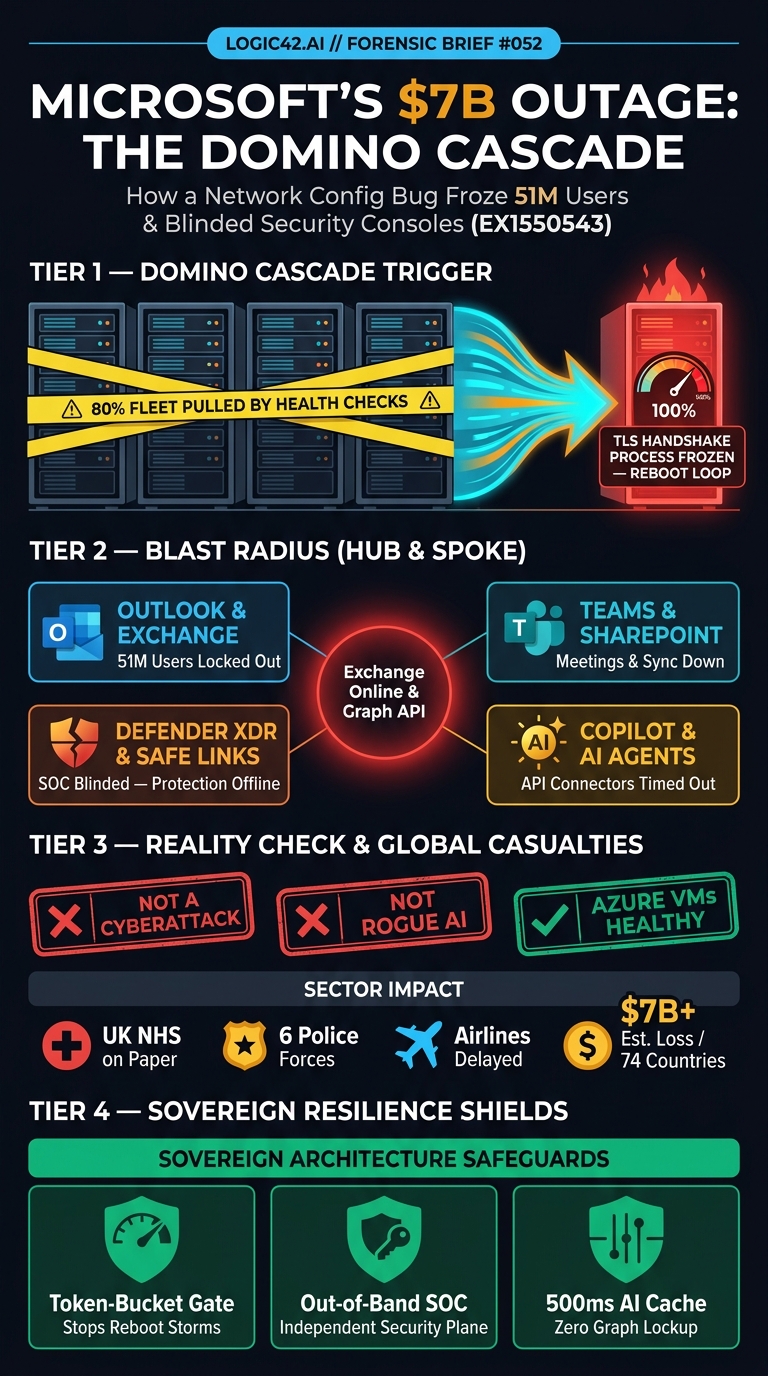
By Friday, November 13, economic research firm Anderson Economic Group estimated that the outage disrupted 26 million users on Thursday and 51 million users on Friday, generating at least $7 billion in lost productivity. UK National Health Service (NHS.net) hospitals reverted to paper records, five UK police forces and the Australian Federal Police reported degraded administrative messaging, Euronext experienced service disruptions, and airlines including IndiGo and Akasa Air faced operational delays.
Confirmed Telemetry vs Viral Rumors
When a tier-one SaaS substrate goes dark for a full business day, social feeds fill with speculation faster than engineering advisories update. Before examining the control-plane mechanics, security and infrastructure leaders need a strict separation between verified telemetry, disproven rumors, and pending post-incident artifacts.
| Claim or Observation | Forensic Status | Verified Source & Technical Reality |
|---|---|---|
| Nation-state cyberattack or DDoS breach | Debunked | Microsoft EVP Charles Lamanna, US Homeland Security officials, and independent telemetry confirmed zero malicious or cyber activity. |
| Rogue AI agents or "vibe-coded" deployment | Debunked | Microsoft explicitly confirmed the outage was not caused by AI or autonomous agents; AI tools failed strictly as downstream API consumers. |
| Customer Azure IaaS Virtual Machines crashed | Debunked | Customer-deployed Azure VMs remained healthy. Confusion arose because M365 shares the status.cloud.microsoft portal and borrowed Azure elastic capacity during recovery. |
| Network config interaction + health-check eviction | Confirmed (EX1550543) | A latent flaw from an earlier network capacity upgrade interacted with a subsequent network configuration change, causing large server batches to fail internal health checks. |
| Secure-connection handshake saturation on reboot | Confirmed (EX1550543) | Surviving Exchange Online nodes were overwhelmed by TLS/secure-connection handshakes; restarting evicted servers triggered immediate reconnect freezes. |
| Defender XDR, Safe Links, and AI connectors degraded | Confirmed (MO1550821) | Defender XDR portals failed to load, quarantine release stalled, Safe Links URL checks timed out, and OpenAI/Anthropic M365 connectors threw HTTP 503/504 errors. |
| Formal Microsoft Post-Incident Review (PIR) | Pending Publication | Core mail and Teams functionality stabilized by November 14 with mail retry timeouts extended to 48 hours; Microsoft's formal PIR in the M365 Admin Center remains pending. |
What Triggered the November 2026 Microsoft 365 Outage?
The November 12–14, 2026 Microsoft 365 outage (EX1550543 and MO1550821) was triggered by a latent defect from an earlier network capacity upgrade that interacted with a subsequent network configuration change. This interaction caused large batches of Exchange Online servers to fail automated internal health checks and drop out of active rotation, overwhelming the secure-connection handshake process on surviving servers and creating a metastable reboot freeze across Teams, SharePoint, Defender XDR, and third-party AI connectors.
In distributed systems engineering, a metastable failure occurs when a transient trigger pushes a cluster into an overloaded state that sustains itself even after the original trigger is removed. You can't fix a metastable loop by simply rebooting servers.
Microsoft's EX1550543 status advisories document a textbook four-stage metastable cascade across the Exchange Online fleet:
-
Latent Defect Activation: During a prior network capacity upgrade, a subtle defect entered the infrastructure layer. It didn't surface immediately and remained dormant until engineers rolled out a routine network configuration change on November 12.
-
Automated Health-Check Eviction: The interaction between those two network changes caused a large percentage of Exchange Online servers to fail automated internal health probes. The fleet controller reacted as programmed and pulled those "unhealthy" servers out of active rotation.
-
Secure-Connection Process Saturation: Pulling a massive slice of the fleet offline forced 100% of global Outlook web (
OWA), desktop (MAPI), mobile (Exchange ActiveSync), and REST API traffic onto the shrunken pool of surviving nodes. In Microsoft's exact advisory wording, "a process on the affected servers responsible for establishing secure connections becomes overwhelmed, causing the servers to stop processing requests." -
The Cold-Reboot Reconnection Trap: When Microsoft engineers attempted to restart the evicted servers and return them to service, millions of waiting Outlook, Teams, and mobile clients instantly fired queued reconnection requests. Because cryptographic TLS session negotiation isn't cheap on CPU cores, each newly restarted batch immediately choked on the reconnect surge and froze again.
Retry loops don't heal capacity. As we analyzed in our engineering breakdown of multi-region LLM fallback and retry storms, unthrottled client reconnections turn a partial capacity dip into a total fleet lockup. Microsoft could only break the loop by freezing deployments, rolling back the conflicting network change, modifying how internal health probes evaluated server state, and throttling client intake while bringing server batches back in staged increments.
Why Defender XDR and AI Connectors Collapsed Together
For Chief Information Security Officers (CISOs) and AI platform architects, the most alarming artifact of the November 2026 outage wasn't delayed email. It was the simultaneous collapse of security operations and enterprise AI assistants under incident MO1550821.
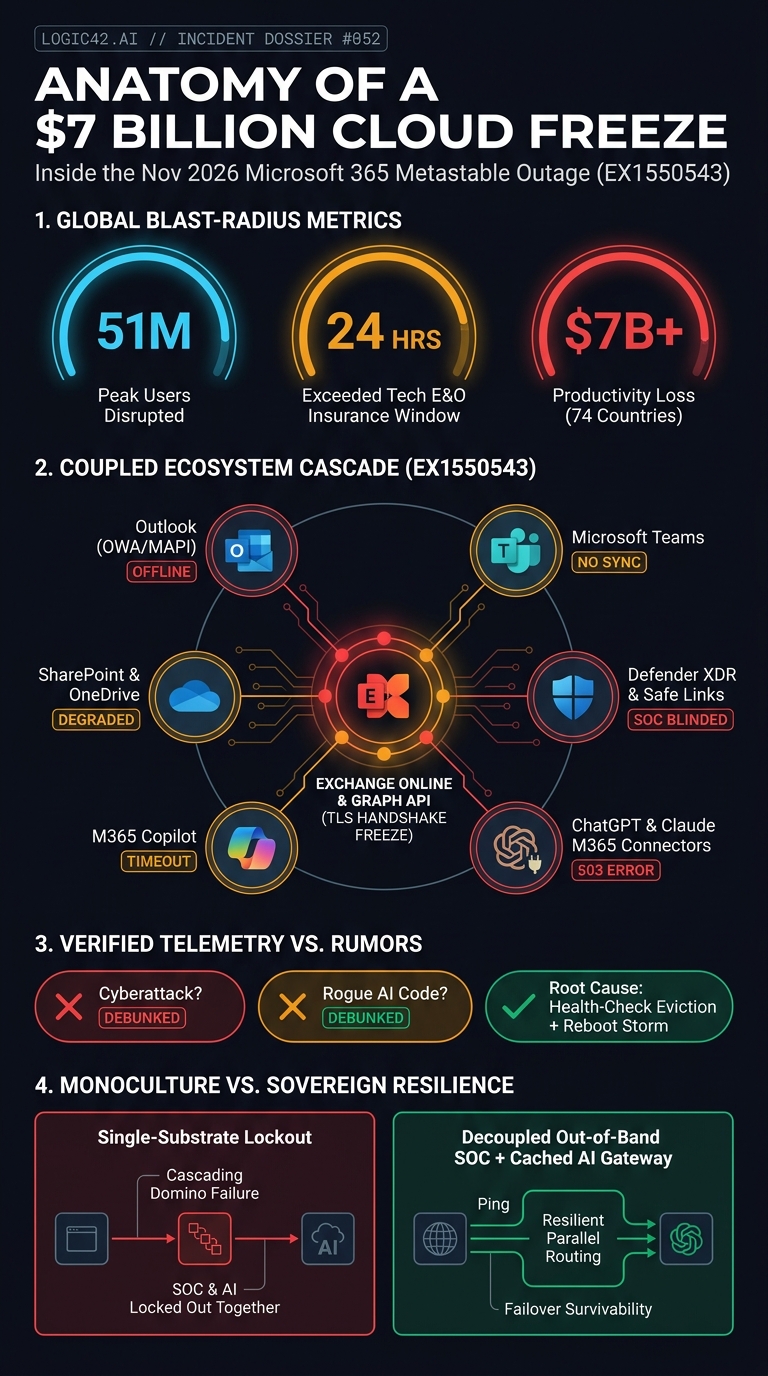
First, security control-plane coupling blinded Security Operations Center (SOC) teams mid-incident. Because Microsoft Defender for Office 365, Purview compliance policies, and Defender XDR (Extended Detection and Response) share identity, directory, and mail-substrate dependencies with Exchange Online, security administrators reported that Defender XDR portal views failed to load. Teams couldn't inspect or release quarantined messages, and Safe Links URL verification timed out when employees clicked links inside desktop clients. When your security console shares a synchronous failure domain with your productivity suite, an availability incident automatically becomes a security visibility black hole.
Second, enterprise AI agents suffered synchronous upstream starvation. Throughout 2026, enterprises wired Microsoft 365 Copilot, OpenAI's ChatGPT M365 Connector, and Anthropic's Claude for Outlook directly into live Exchange Online and Microsoft Graph endpoints. During the outage, both OpenAI and Anthropic posted official status alerts confirming elevated error rates on their Microsoft 365 connectors. Every autonomous workflow that queried live inbox context, calendar availability, or SharePoint permissions stalled on upstream HTTP timeouts.
Third, insurance waiting periods were breached. Cyber-risk modeling firm CyberCube activated catastrophe protocols on November 13 because the 18-to-24-hour outage window crossed the standard 12-to-24-hour deductible waiting period written into enterprise business-interruption and technology errors-and-omissions (Tech E&O) policies.
Coupled SaaS Monoculture vs Decoupled Sovereign Resilience
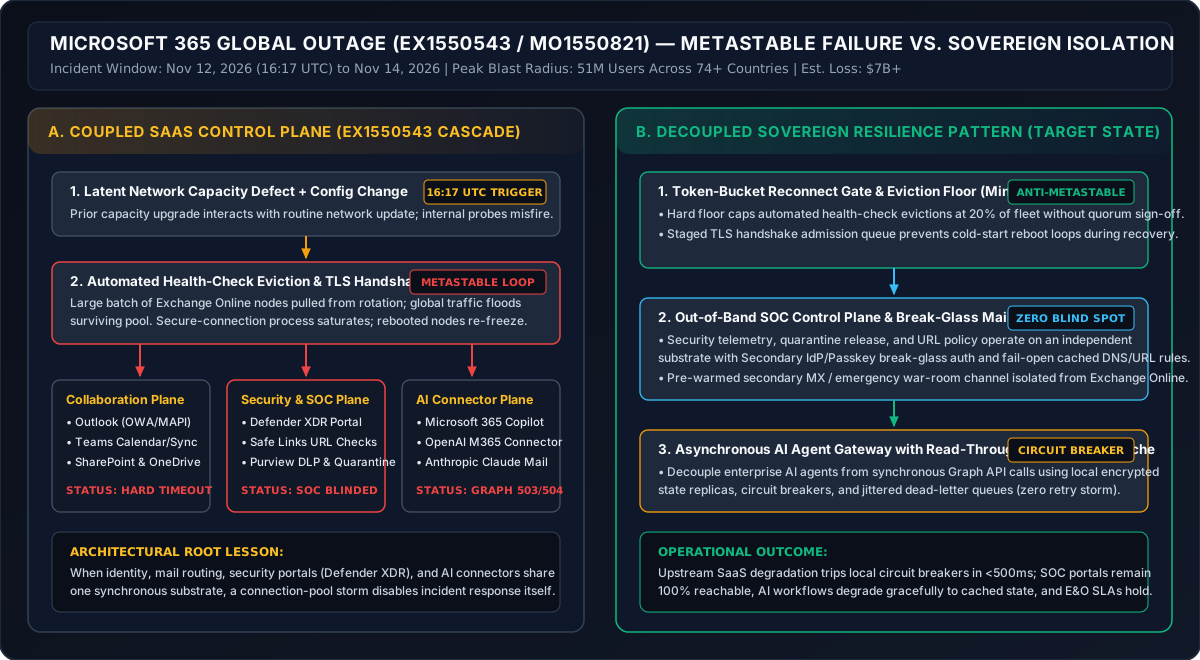
Architects cannot prevent a hyperscaler from pushing a bad network configuration, but they can prevent a single vendor's connection-pool freeze from paralyzing their security operations center and AI runtime.
| Architectural Dimension | Coupled SaaS Monoculture (Default M365 Posture) | Decoupled Sovereign Enterprise Pattern |
|---|---|---|
| Health-Check & Reconnect Admission | Unbounded automated node eviction + synchronous client reconnect storms on server restart. | Hard Min-Healthy-Pool eviction floor (caps auto-removal at 20%) + token-bucket TLS admission gate. |
| Security & SOC Control Plane | Defender XDR, quarantine management, and Safe Links coupled to primary mail and identity provider (IdP) substrate. | Out-of-band SOC telemetry plane, independent passkey break-glass IdP, and local cached DNS/URL policy. |
| Crisis War-Room Communications | Incident response relies on Teams and Outlook (EX1550543 takes down the war room itself). | Isolated secondary mail-exchange (MX) routing record and pre-provisioned crisis channel on separate cloud infrastructure. |
| Enterprise AI & Agent Connectors | Synchronous live calls from Copilot, ChatGPT, and Claude to Microsoft Graph API on every prompt. | Asynchronous sovereign gateway with local encrypted read-through state cache and 500ms circuit breakers. |
| Business Continuity & SLA Exposure | Full operational halt across 18–24 hours; crosses Tech E&O catastrophe waiting thresholds. | Graceful degradation to local cached state and secondary comms within 60 seconds; zero SOC blind spot. |
To audit whether your organization's identity, mail, and agent pipelines share hidden single points of failure, evaluate your control boundaries against our ISO 27001 Infrastructure & Continuity Readiness Assessment and review how sovereign data substrates isolate operational blast radii.
How Can Enterprises Insulate AI Agents and SOC Workflows From SaaS Outages?
Engineering leaders can decouple their operational resilience from hyperscaler control-plane freezes by enforcing four concrete controls:
-
Provision an Out-of-Band SOC and Break-Glass Identity Plane: Never host your incident war room, quarantine release tooling, or primary SIEM (
Security Information and Event Management) access exclusively inside the same tenant substrate as your daily email and chat. Maintain a hardware-token or passkey-backed break-glass identity provider and a secondary crisis communication channel on an independent network backbone. -
Insert an Asynchronous Circuit-Breaker Gateway in Front of M365 AI Connectors: Instead of letting ChatGPT, Claude, or custom internal agents make blocking synchronous calls to
graph.microsoft.comduring user prompts, route connector traffic through an internal gateway with a 500-millisecond timeout, jittered exponential backoff, and an encrypted local read-through cache of recent calendar and document metadata. You can stress-test your agent gateway topologies using our Enterprise AI Security & Resilience Assessment. -
Configure Secondary MX and Extended Queue TTL Policies: While Microsoft extended incoming email retry windows to 48 hours after
EX1550543, regulated healthcare, police, and financial institutions can't wait two days for transactional dispatches. Configure secondary mail-exchange (MX) failover relays with local encrypted journaling for critical operational domains so inbound clinical or dispatch alerts remain readable via an emergency webmail enclave. -
Demand Fleet Eviction Floors and PIR Transparency in Enterprise SLAs: When Microsoft publishes the formal Post-Incident Review (
PIR) forEX1550543andMO1550821, enterprise cloud architects should verify whether automated health-check controllers have been updated with a minimum-healthy-quorum floor that halts mass server eviction before TLS handshake processes cross their saturation cliff.
Hyperscale SaaS platforms optimize for deep cross-product integration, wiring mail, chat, document storage, security telemetry, and AI copilots into a single graph. When that graph is healthy, velocity compounds; when a connection-pool process locks up, only deliberate architectural decoupling keeps your security operations and enterprise workflows online.
Enjoyed this autopsy? Get next Monday's architecture teardown + SVG blueprints in your inbox.
1 email every Monday morning. Zero marketing fluff — just real VRAM math, MCP security traps, and sovereign lakehouse patterns.
Further Reading
Bleeding Llama (CVE-2026-7482): GGUF Memory Leak Defense
How the critical Bleeding Llama (CVE-2026-7482) heap over-read in Ollama's GGUF loader leaks live LLM prompts and API keys, and how to harden enclaves.
Inside the US FAA Ground Stop: How a TDM Router Flood Halted Flights
How an L3Harris TDM-to-fiber cutover router flooded the FAA FTI network with 1,000 connection requests every 5 seconds and grounded US aviation.
The MCP STDIO Master Key Trap: Local Agent RCE & IAM Bypass
Spawning local MCP servers via STDIO leaks host environment variables, SSH sockets, and Cloud IAM tokens. Isolate agent tools with Landlock LSM and STS brokers.
vLLM Multimodal RCE & SSRF (CVE-2026-22778): GPU Cluster Defense
How unauthenticated attackers chain vLLM MediaConnector SSRF (CVE-2026-24779) and heap overflow RCE (CVE-2026-22778) to hijack enterprise GPU clusters.
See HiveOS Enterprise & Bea (Business Execution Assistant) in Action
HiveOS connects to 5,000+ workplace apps with client-side PII redaction, 3-model consensus verification, and 80%+ local SLM cost savings. Watch the 30-second Executive Overview and 3-minute Walkthrough on gethiveos.com, or download the 6-slide Product Brochure.
Auditing Runtime & Agentic Containment?
If your engineering teams are deploying autonomous tool loops, MCP servers, or evaluation sandboxes, our cyber practice conducts confidential architectural reviews to expose link-local leakage, SSRF vectors, and credential harvesting paths.
Debugging this pattern in your own stack? Ask a Principal Architect directly or request a free 48-hour architecture sanity check: